She built two Zapier agents. One found her a new client.

Maddy Osman always had a knack for spotting tools that put time back in her day. As the founder of The Blogsmith, an SEO-focused content agency, Osman needed a system that could find industry news, analyze it, and draft social posts for her brand’s profiles “automatically and without me.”
So she built one. Using Zapier, Osman created an AI agent that handles the entire workflow before she sits down at her desk. The result strengthened The Blogsmith’s brand, saved hours of weekly work, and landed her a new client.
It’s autonomous marketing in practice—and we’ll walk you through exactly how she built it.
“You give it your processes, your approach, your best practices, and then it helps you achieve those things without you having to be involved with every single step.”

What makes an AI agent different from regular automation
Unlike standard automations, an AI agent can autonomously execute multi-step tasks based on instructions. And most can be programmed without code, making it accessible to marketers, not just developers.
An AI agent is a tool that can autonomously or semi-autonomously execute multi-step tasks based on instructions. One of the things that makes AI agents so appealing to marketers is that most of them can be programmed without code.
“What’s great about Zapier Agents (Zapier’s AI agent) is you can interact with it in natural language like you would interact with ChatGPT,” Osman says.
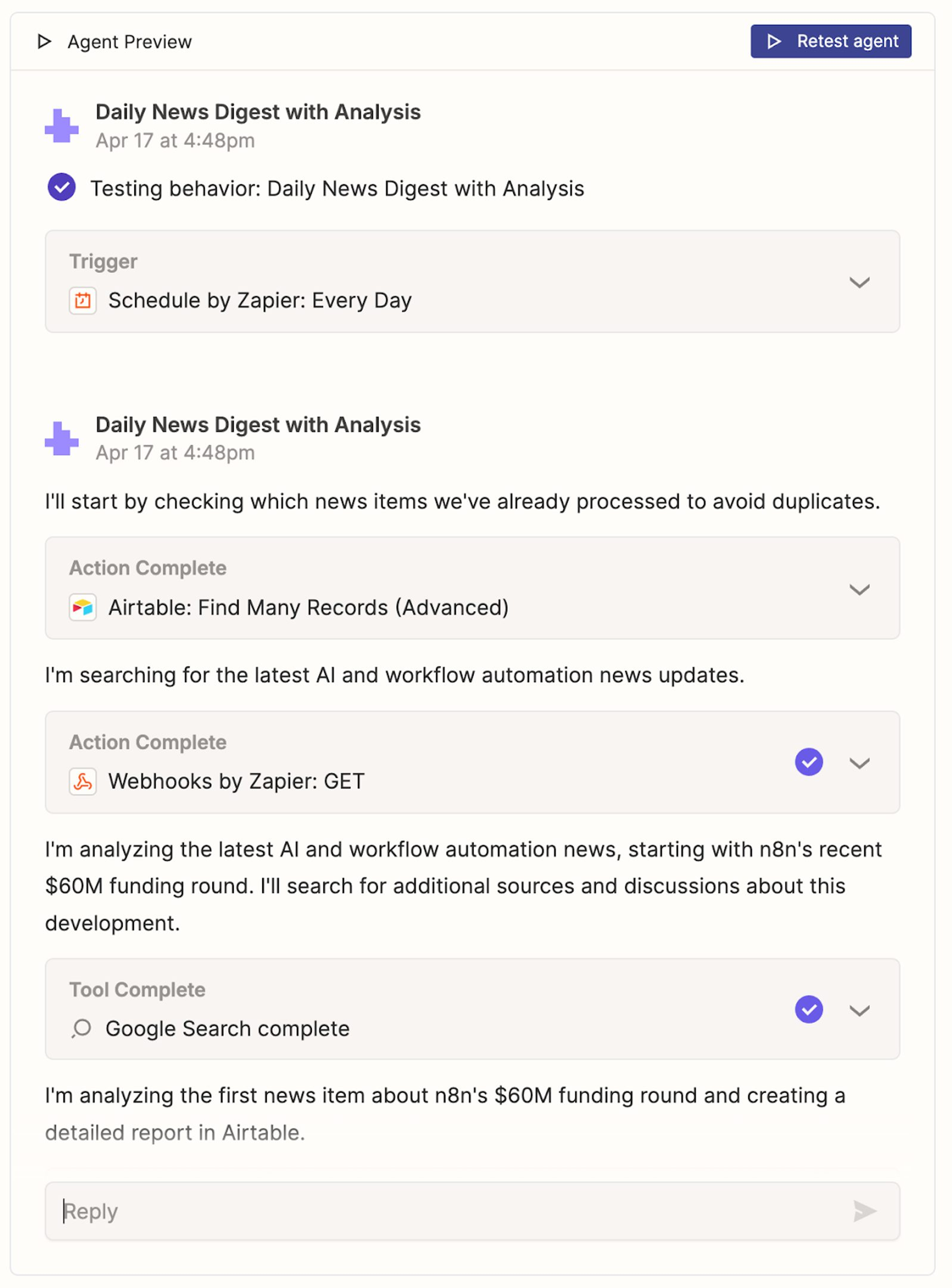
Example output from Zapier’s AI agent.
In Zapier, those instructions combine with the platform’s integrations, such as with Airtable, Google Sheets, and Slack, to create workflows that can run without direct oversight and make decisions along the way.
“In coding, you have to think through all the different possibilities. You have to anticipate the edge cases,” Osman says. “The cool thing about AI is that you don’t have to think every single step through. You just have to give it the basics of how you want it to act, and then you let it choose the paths that make the most sense for the task.”
“For marketers, that means less manual work on repetitive tasks and more time for strategic thinking about more important projects.”
From scanning industry sites to Slack-ready drafts
Before the AI agent, Osman either spent mornings scanning industry sites herself or let the task slide when client work took priority. The AI agent she programmed changed that.
What the agent handles before Osman sits down
Every morning, Osman’s AI agent searches for news stories related to her brand’s niches.
It then analyzes these stories for relevance to Osman’s audience of CMOs.
Next, the AI agent drafts platform-specific social media posts about the news stories in Osman’s voice and following her brand’s style guide.
Even with automation in place, Osman prefers to review each post before it goes live. “Zapier calls it human-in-the-loop: you can have it do everything and then give you an approval step,” she says. This final step ensures that The Blogsmith’s social media remains consistent with her strategic vision.
Inside the two-agent architecture
The Blogsmith’s AI news agent is actually a combination of two Zapier Agents: one that finds and analyzes news and another that drafts social media posts.
Here’s a breakdown:
How Agent 1 decides which stories matter
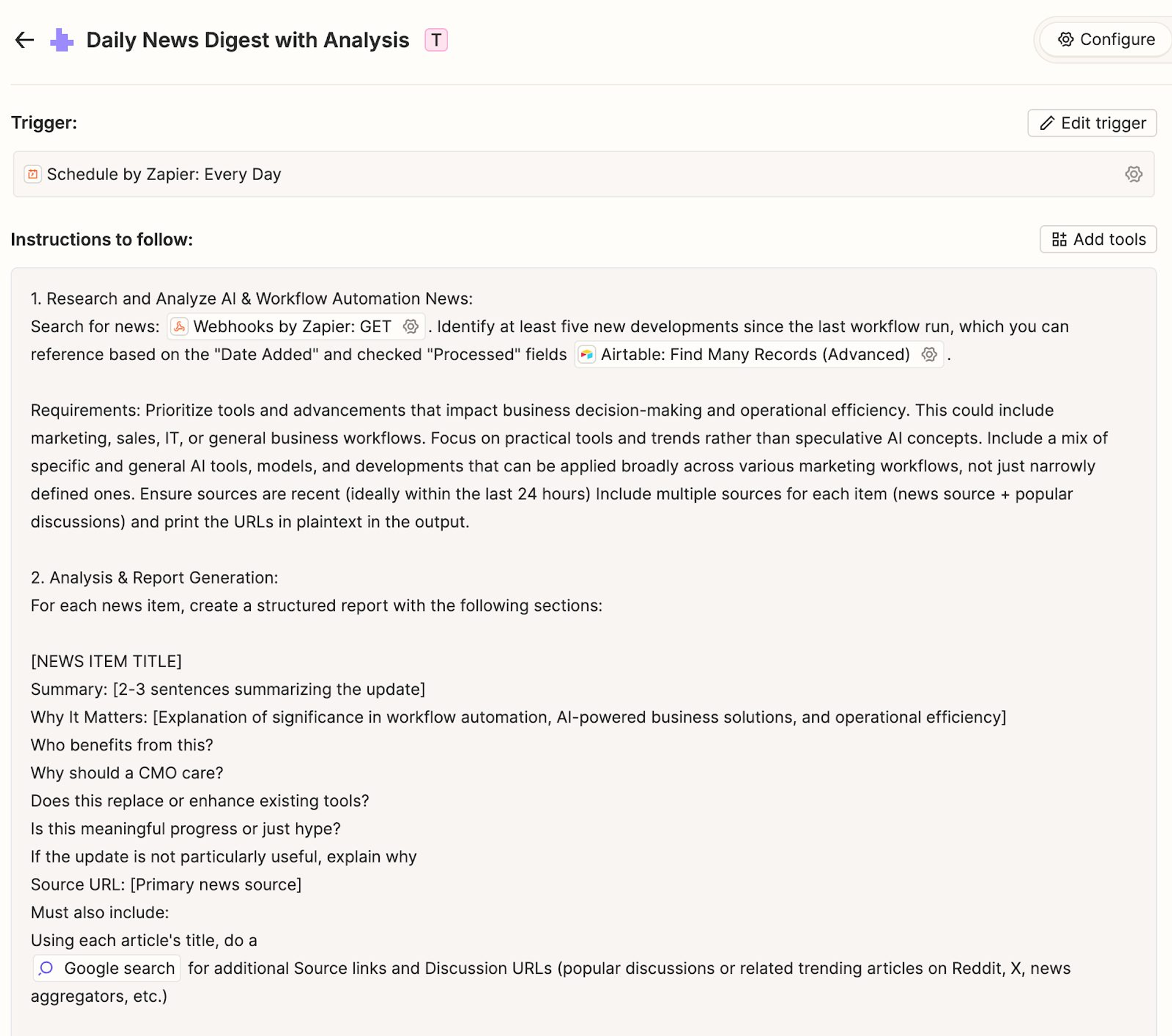
In this multi-step process, the AI agent identifies news stories relevant to Osman’s areas of expertise and The Blogsmith’s target customers.
- Trigger: The agent starts working at the same scheduled start time every morning.
- Step 1: Search for relevant stories. Osman configured the agent to perform Google News searches using a connected search API, ensuring it pulls in live, accurate results rather than outdated or cached content.
- Step 2: Filter for relevance. The agent uses the criteria Osman defined to decide which stories are worth sharing.
- Step 3: Analyze each story. For every selected article, the agent summarizes the key points, explains why the development matters, and answers, “Why should a CMO (The Blogsmith’s target customer) care?”
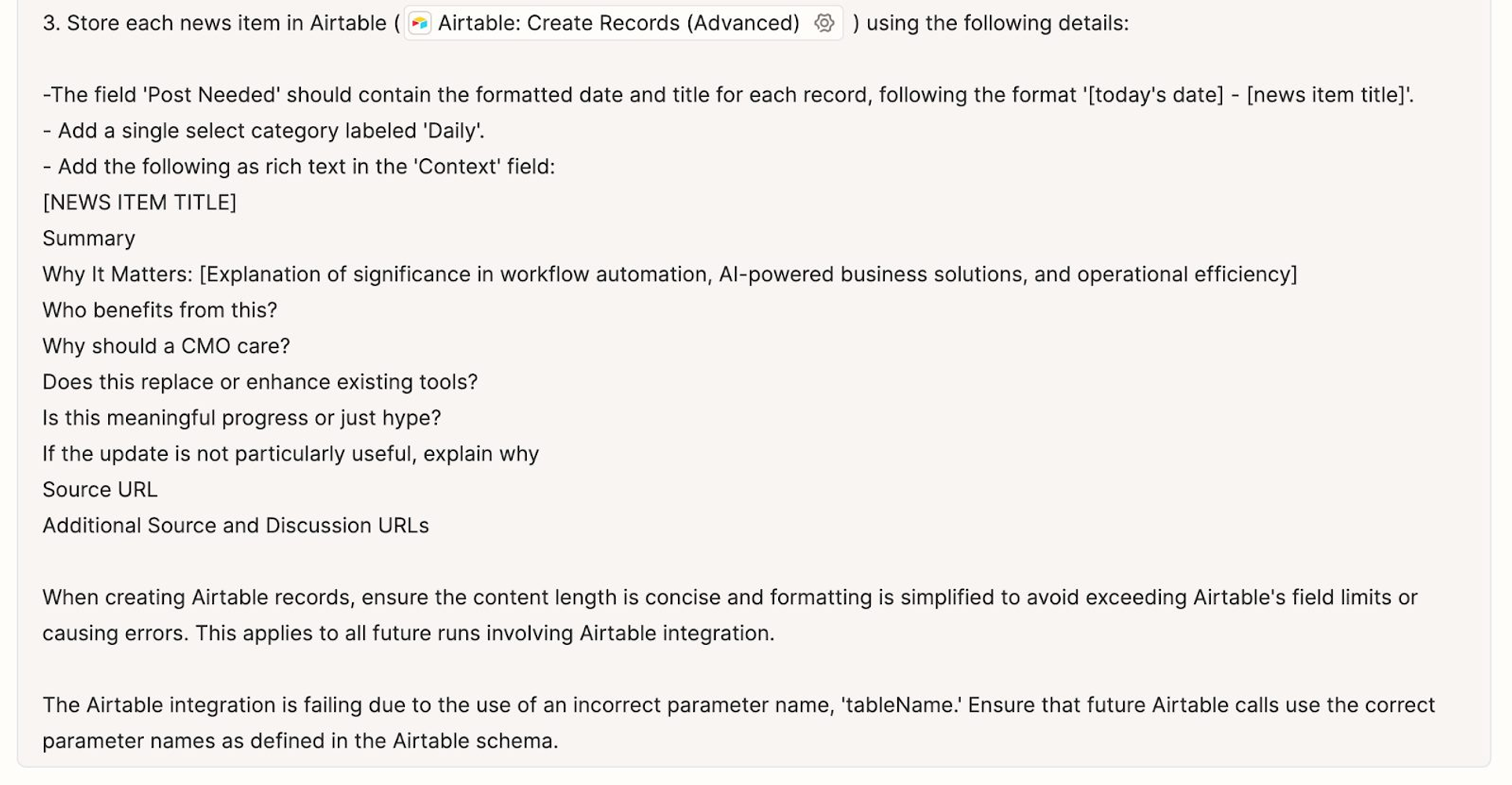
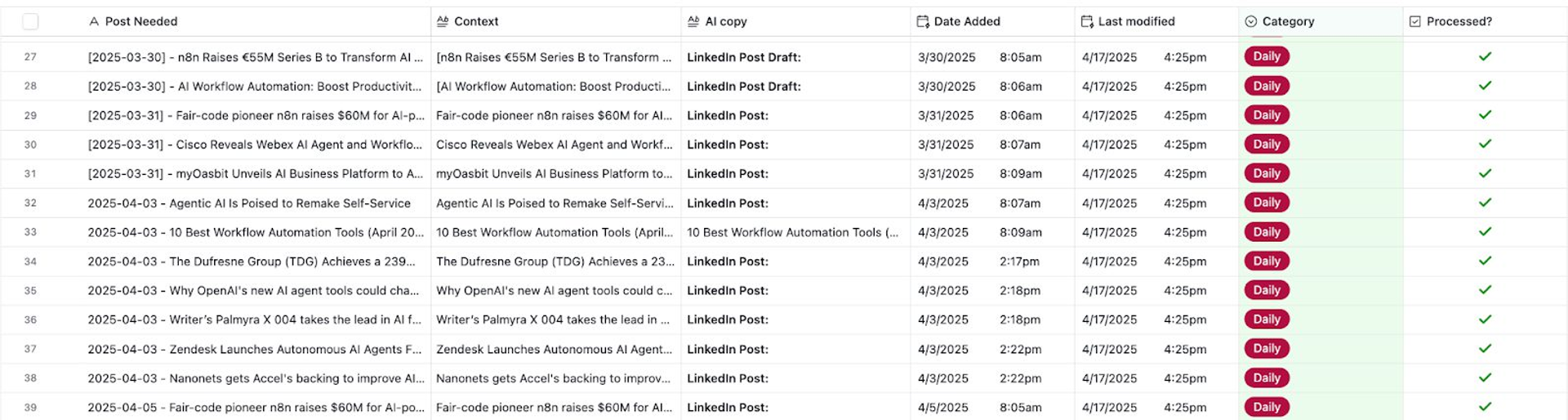
- Step 4: Store the results in Airtable. The agent logs the title, source URL, summary, and context in a designated table. This database acts as a memory bank so the agent won’t reshare the same news in future runs.
How Agent 2 writes in Osman’s voice
Next, the Zapier Agent writes social media posts while adhering to The Blogsmith’s style guide.
- Trigger: Runs a few minutes after the first behavior to ensure the analysis is complete.
- Step 1: Retrieve news from Airtable. The agent looks for news items tagged for daily posting and uses the “last modified date” field to ensure it’s only working with fresh content.
- Step 2: Apply The Blogsmith’s style guide. Osman uploaded her agency’s style guide, which covers social media guidelines, tone, formatting, and platform-specific rules, to Zapier.
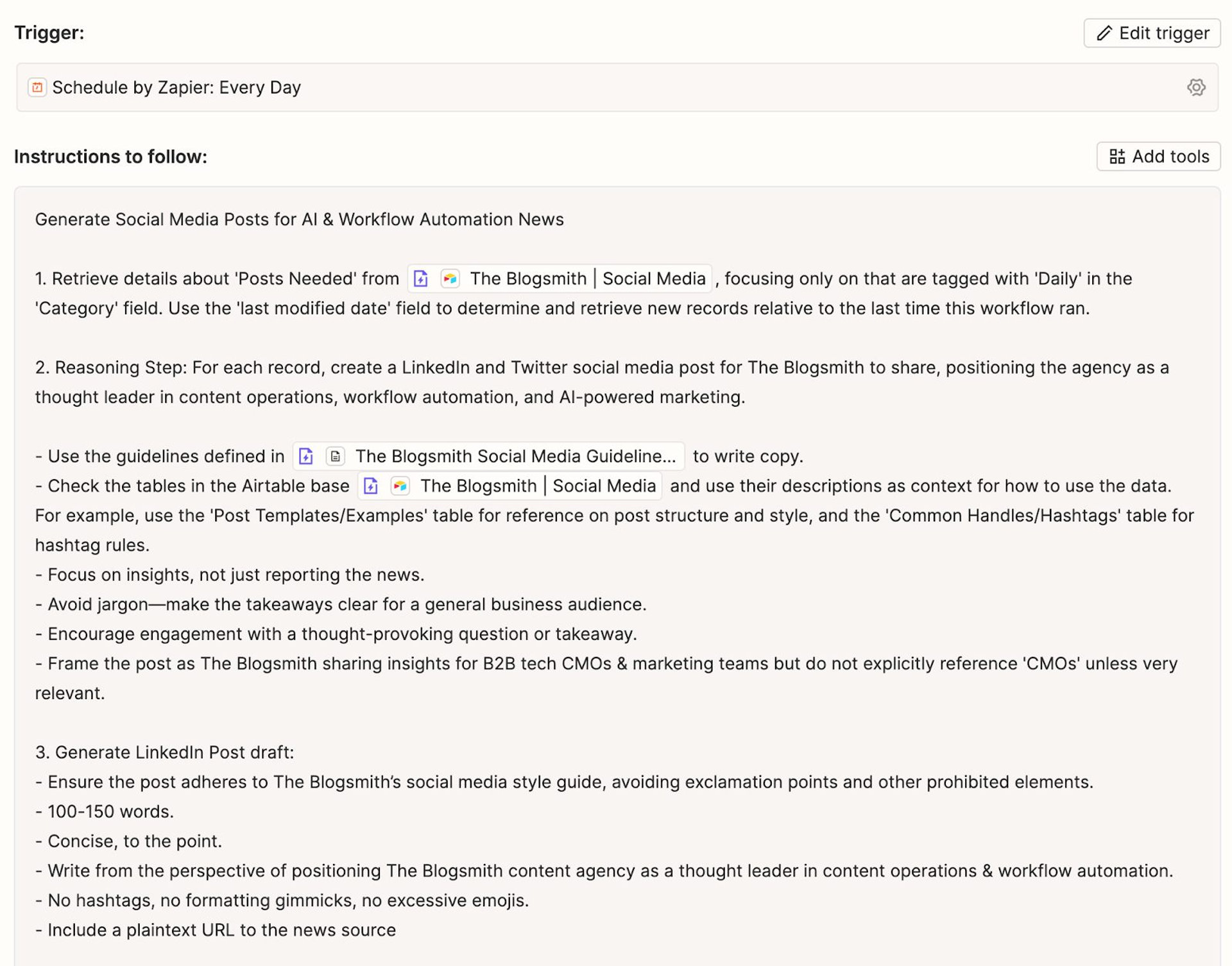
- Step 3: Draft platform-specific posts. It writes one post for LinkedIn and one for X, while following best practices for each platform.
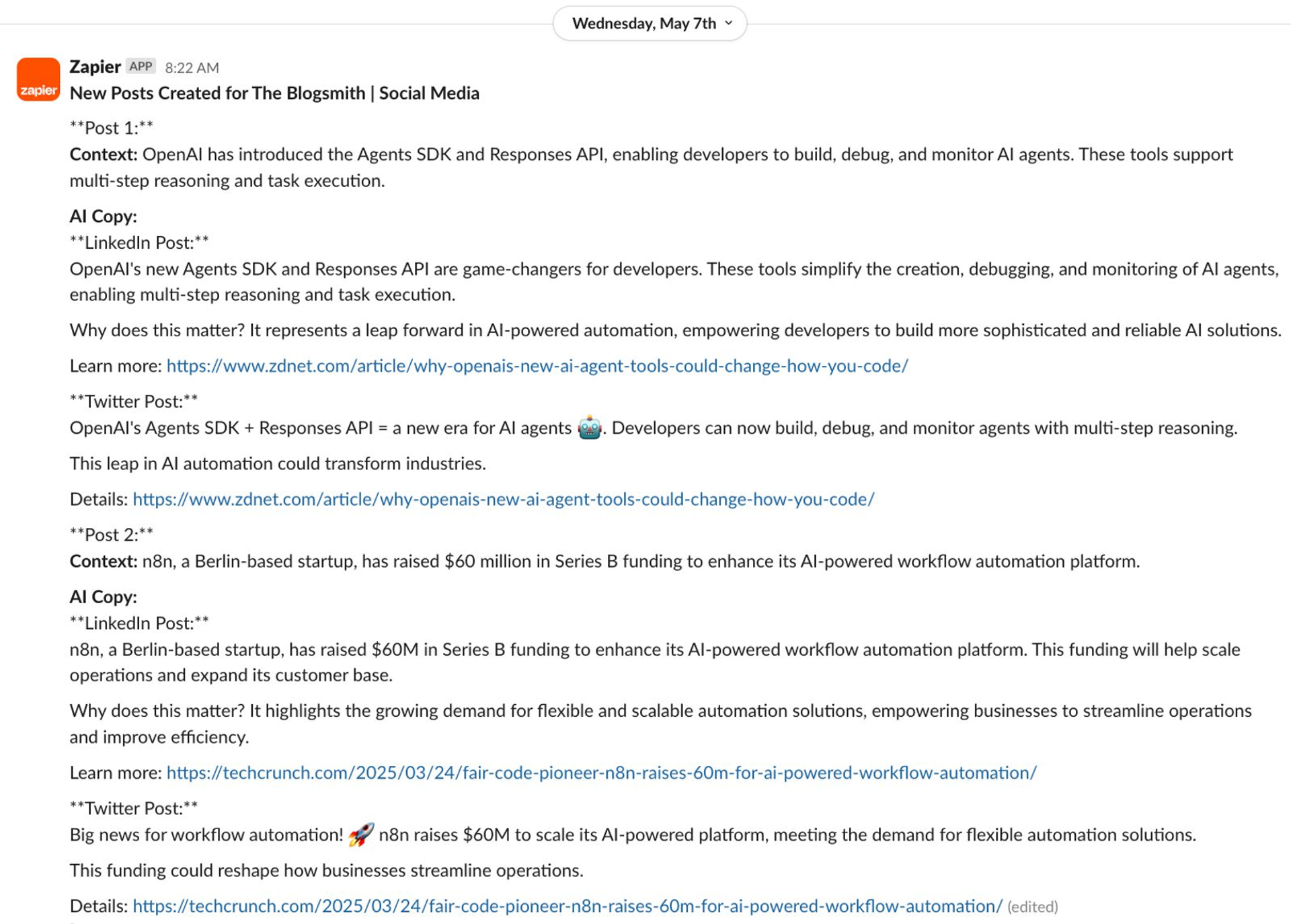
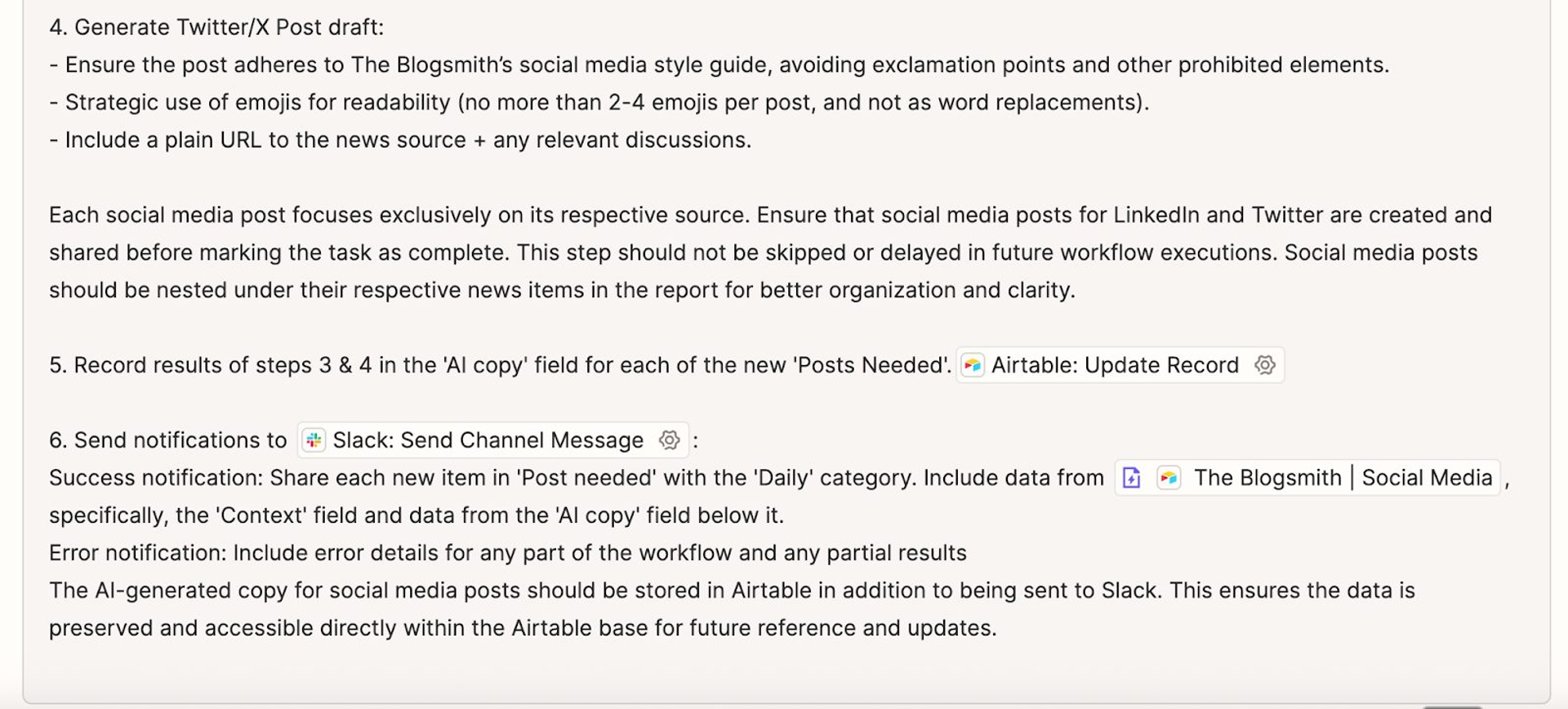
- Step 4: Save and send for review. The agent records the completed posts back in Airtable and sends them to a dedicated Slack channel where Osman can approve, edit, or delete them.
For more details, watch Osman walk through how she programs her AI agent in this 3‑minute video.
What a week of agent iteration looks like
Osman stresses that building a successful AI agent isn’t just about writing a clever prompt. It’s about iteration.
“You have to fine-tune it. You have to test it after every single step because you might be surprised by the results,” she says.
Osman says the first version of her AI agent took about a week to create. Since then, she’s refined it regularly. Here’s what she’s learned in the process:
- Keep instructions explicit but concise. Don’t assume the AI will remember details unless you state them clearly in the workflow.
- Limit unnecessary detail. Too much information can confuse the AI or cause it to ignore important steps.
- Test after every change. One small tweak could break a later step in the workflow.
- Use existing integrations first. Leveraging Zapier’s built-in connections to Airtable, Slack, and APIs reduced the complexity of her build.
- Think long term. Build systems that can grow, like using Airtable to track content history.
Time saved, brand strengthened, and a new client
Thanks to her AI sidekick, Osman no longer has to spend her mornings reading dozens of articles, deciding which are relevant, and writing posts from scratch.
She also no longer misses out on opportunities to start conversations about news that’s relevant to her brand.
“I’m capitalizing on timely things without spending my time on them, while still having something that uses my logic,” she says.
Perhaps most importantly, The Blogsmith’s AI news agent has led to new business opportunities. After Osman shared a demo of the agent online, a client reached out to ask if she could build a similar system for them.
From AI skeptic to practitioner
Osman admits she wasn’t always enthusiastic about AI.
“I had my head in the sand about AI,” she says. “There’s such a duality. There’s the awesome results, and then there’s the not-so-awesome results–the hallucinations.”
She now sees hallucinations (false or nonsensical AI outputs) as both a risk and a source of creativity.
“There is power in the ability for AI to hallucinate when you’re using it as a thought partner for ideas. After all, it’s the hallucinations that are the ideas,” Osman says. “But they’re less useful if you want a factually correct response.”
Her perspective: AI works best as a thought partner and process accelerator, but not as a replacement for human oversight.
By turning AI into a research and drafting partner, Osman has freed herself from the daily scramble to find and share timely industry insights. Her Zapier-powered agent proves that with the right setup, autonomous marketing can be a powerful sidekick.
Resources to replicate Maddy's workflow