RAG 101: Stop using “chatbots” and start building engines
RAG turns your content library into a working knowledge system that powers faster decisions, better outputs, and scalable execution. Instead of constantly reinventing workflows, build systems that get smarter with every interaction.

Many marketers hit the same wall with AI: They ask it something specific, and it responds with something plausible, but wrong.
In my capacity running my content agency, The Blogsmith, this has certainly been my experience. Sometimes I laugh about it, and other times I sweat the fact that I could’ve missed the error and included it in client work. And even though LLM chatbot memory has improved greatly, details still get lost or distorted between chat sessions.
The root cause of these AI usage issues is usually the same: most marketing workflows still operate as isolated chat interfaces rather than as systems connected to institutional knowledge.
Retrieval-augmented generation, or RAG, is how I turned my content library from a passive archive into an active knowledge system powering multiple workflows. Instead of asking AI to guess, RAG gives the agent a way to look things up first, specifically in a knowledge base built from content I have already created.
The responses I get back reference my published work, reflect my documented thinking, and hold up to scrutiny in a way that generic AI outputs can’t reliably achieve.
Before getting into the workflow itself, let’s explore what RAG actually does and why it behaves so differently from a standard chat session.
The two are easy to conflate, and that confusion is usually what leads marketers to underestimate what a well-built RAG system can do for them in their autonomous marketing strategy.
What is RAG?
RAG stands for “retrieval-augmented generation.” At its core, it’s a way of connecting an AI model to a knowledge base you control, so the model can look things up before it responds rather than relying entirely on what it learned from its general training data.
The “retrieval” part is what sets it apart from a standard chat session. Before generating a response, the system:
- Searches a database of your content
- Identifies the passages most relevant to the query
- Feeds them to the model as context
The model then generates its response from that specific material rather than from general training data. Think of it as the difference between asking a colleague a question on the spot versus giving them time to check their notes first.
For example, imagine asking an AI: “How should marketers think about Google’s Quality Rater Guidelines?”
Without RAG, the model might respond: “Google’s Quality Rater Guidelines help evaluators assess search quality. Marketers can use them to better understand E‑E-A‑T and create content that aligns with Google’s expectations.”
The answer is accurate, but it reflects broad industry knowledge rather than any specific perspective.
With RAG, the system first searches my content library and retrieves relevant passages from articles I’ve already written on the topic. In this case, it might pull sections from my article about Google’s Quality Rater Guidelines and use those excerpts as grounding context before generating a response.
The resulting answer might look more like this:
“Google’s Quality Rater Guidelines aren’t a ranking factor themselves, but they provide one of the clearest windows into what Google considers a high-quality result. I find them most useful as a content auditing framework. Rather than focusing solely on keywords, I look for signals of experience, evidence, and trustworthiness, such as firsthand examples, expert commentary, and original research.”
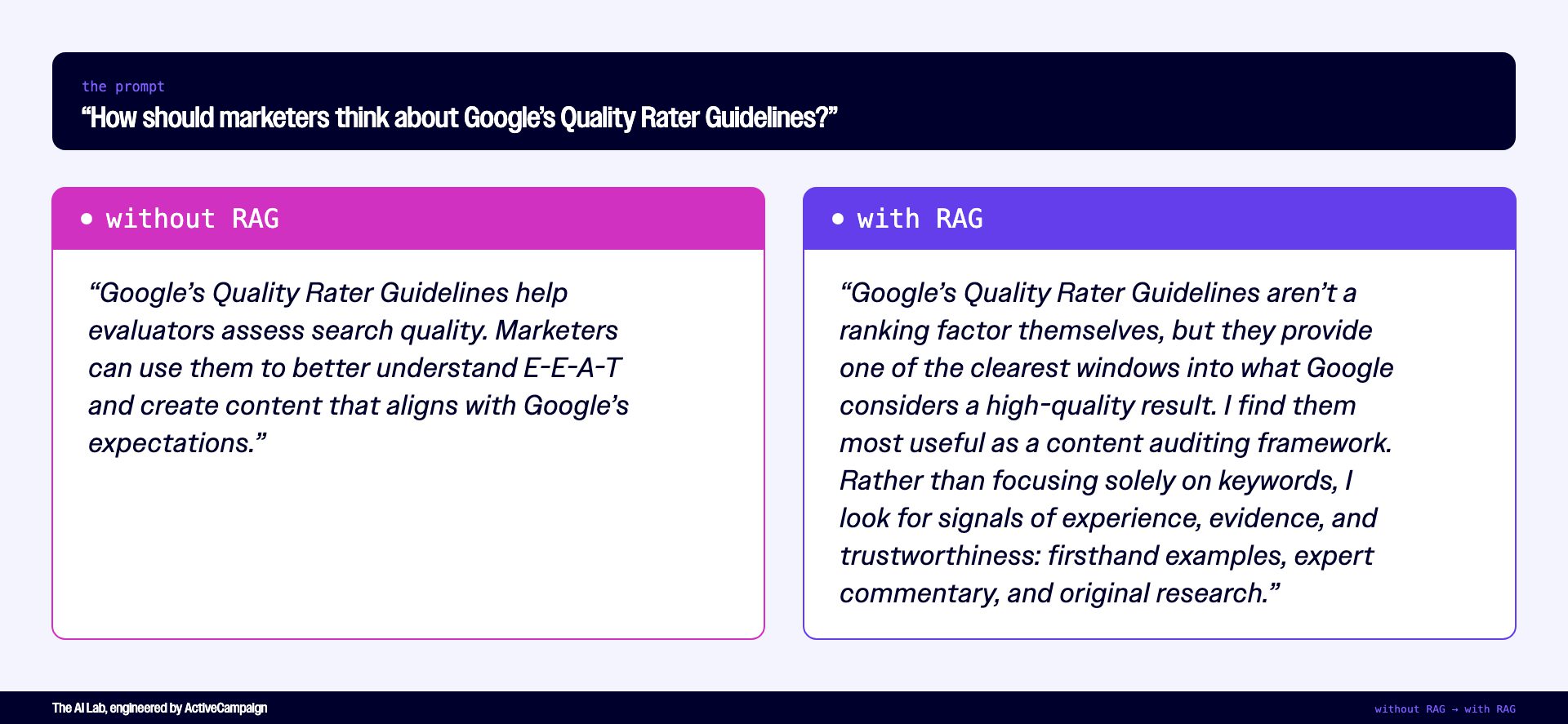
The difference isn’t necessarily that the second answer is more correct. It’s that the system was able to locate a relevant article from my content library, retrieve the most applicable passages, and use them to generate a response grounded in my documented thinking, even though I never provided the article URL during the conversation.
How RAG actually works under the hood
Before a single piece of content can be retrieved, it has to be converted into a format the system can search. That process is called “vectorization,” and it creates vector embeddings. It’s also what makes semantic retrieval possible in the first place.
When I run a blog post or transcript through my vector embedding pipeline, the text gets broken into sections of text or “chunks.” Each chunk gets converted into a vector, a format that allows the system to compare ideas based on meaning rather than exact wording.
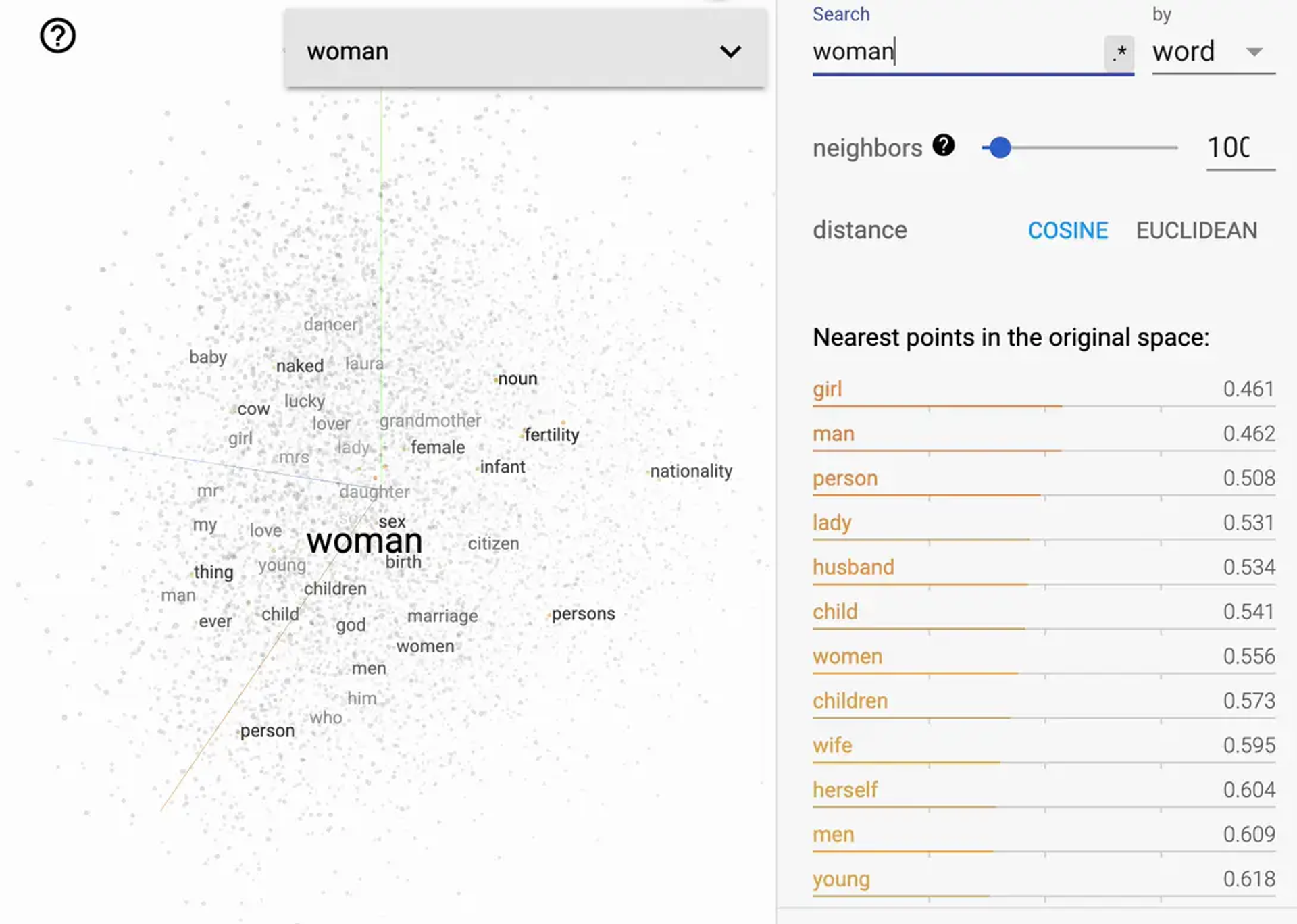
Example of vectors that relate to the word “woman”.
Two chunks about content marketing strategy will end up with similar vectors even if they use completely different words, which is what allows the retrieval system to find relevant material based on meaning rather than keyword matching.
I use Pinecone to store those vectors. Pinecone is a vector database built specifically for semantic search. It’s designed to find content based on meaning rather than exact keyword matches, making it well-suited for quickly retrieving the right passage from a large content library.
Think of Pinecone as an air traffic controller between the agent and the content, directing each query to the right material rather than letting the model sort through everything at once.
How I built my content pipeline, step by step
A RAG system is only as reliable as the content going into it.
Dumping whole documents into a vector database tends to produce noisy retrieval, where the system pulls large chunks that are partially relevant rather than the specific passages that actually answer the question.
Getting clean retrieval requires chunking content into logical sections, tagging each chunk with consistent metadata such as source URL, publish date, and content type, and building an upload pipeline that keeps the knowledge base current as new content is created.
This specific pipeline processes podcast transcripts so an agent can reference relevant episodes when replying to social media posts, but the same general structure applies to any content type you want to make retrievable.
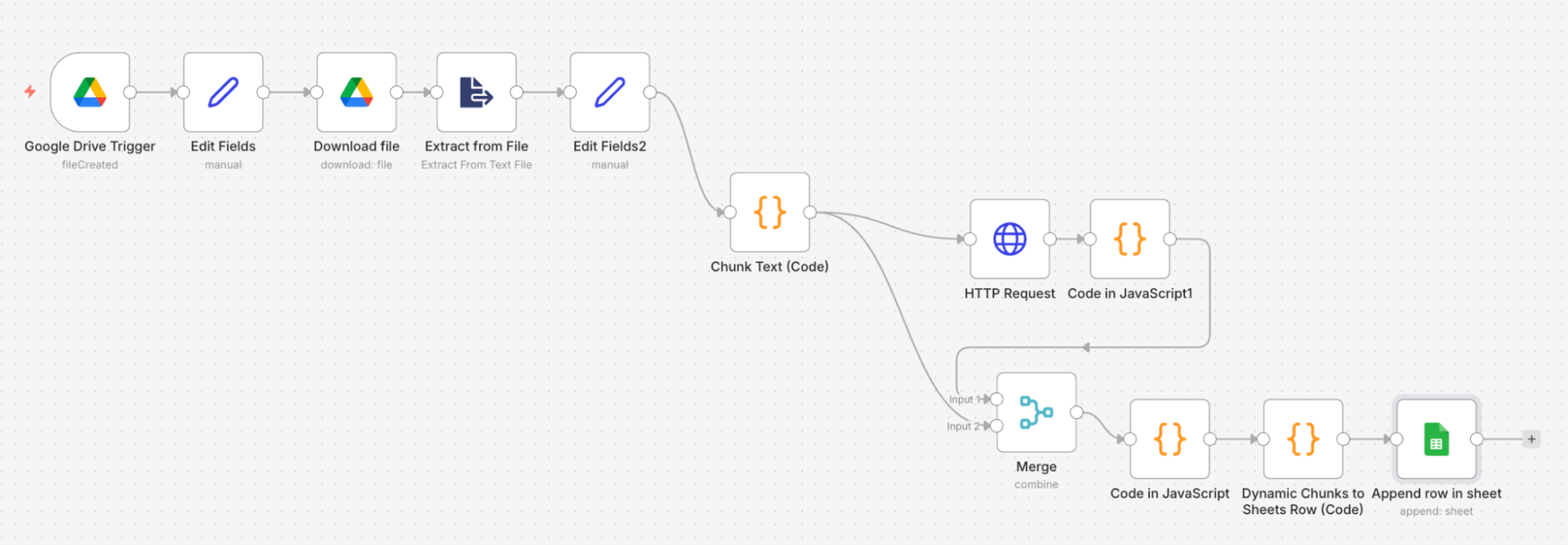
n8n pipeline set to extract chunks from content and feed them as rows to a Google sheet.
For blog content, the ingestion layer could be even simpler. You might monitor an RSS feed for newly published posts, automatically scrape the content when a new URL appears, and then chunk and embed those articles into the same knowledge base. Teams that want more control can also maintain a spreadsheet of URLs and metadata (i.e. categories, authors, publishing dates) that gets processed on demand.
I rebuilt this workflow in n8n after running an earlier version in Zapier. n8n gave me more control over the orchestration logic and made the overall pipeline more robust.
The pipeline runs in two parts: the first triggers automatically when a new file is added to Google Drive, while the second runs manually when I’m ready to embed new content into Pinecone.
Let’s break down how each aspect works:
Step one: grab new content the moment it goes live
The first part of the workflow starts with a Google Drive trigger that fires when a new file is created in a watched folder. When a new podcast transcript is added, the workflow automatically picks it up and passes it to the next step.
Step two: chop big documents into bite-sized, retrievable pieces
Once triggered, the workflow downloads the file and extracts the text. In this case, downloading is a quirk of how this n8n workflow interfaces with Google Drive, not a requirement of RAG itself.
Then, a custom code node splits the content into chunks, breaking it into logical sections rather than feeding the entire document as a single block.
I’m not a developer; I asked ChatGPT to help me write the code:
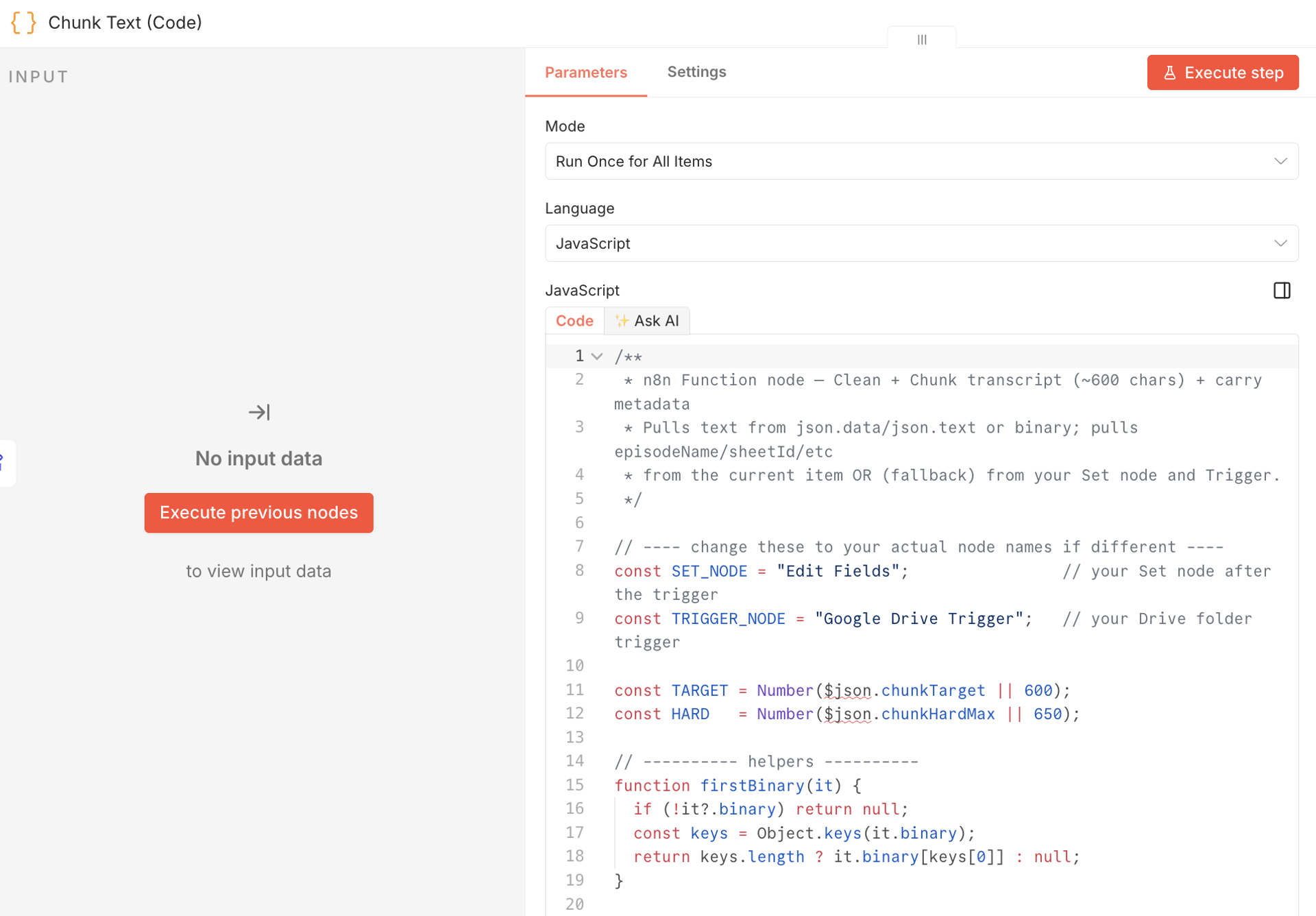
Using a Code node in n8n to chunk data from a Google sheet.
I set up this workflow so the content would be chunked into relatively compact passages (~600 characters), with slight overlap between sections, so ideas don’t get cut off at the boundaries.
The goal is to keep chunks focused enough for precise retrieval while preserving enough context to remain meaningful.
Different content types can call for different chunking strategies—what works well for podcast transcripts may not be what you’d use for documentation, research, or support content.
Note that this chunking is built into the workflow itself, not handled manually, document by document.
The code step prepares each chunk for embedding and storage in Pinecone as a retrievable unit, making chunking part of the ingestion process rather than a separate task.
Step three: never lose track of where content came from
After chunking, the workflow checks whether a source URL was included with the document.
If not, it uses the document title to search the podcast website for the corresponding podcast episode page, retrieves the correct URL, and passes that downstream as metadata attached to each chunk.
Step four: merge and organize content chunks into a Google Sheet
The chunks and their associated URL get merged and formatted, then appended as new rows in a Google sheet. Each row represents one chunk along with its metadata, ready for the embedding step.
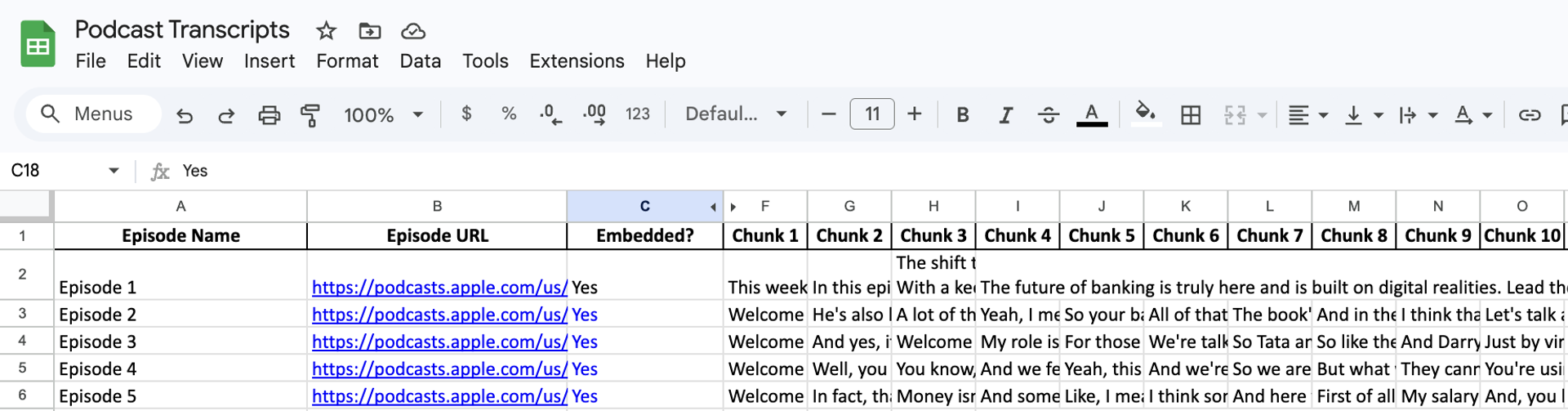
Chunked podcast transcripts in a Google sheet.
Step five: turn the content into something the AI can search
I trigger the second part of the pipeline manually. Embedding content costs OpenAI API credits, so I like to keep it under control.
When I’m ready to process new content, I run this workflow, which pulls new rows from the Google sheet, downloads the latest version of the document, and processes each chunk through a map-and-fan-out step that runs them in parallel.
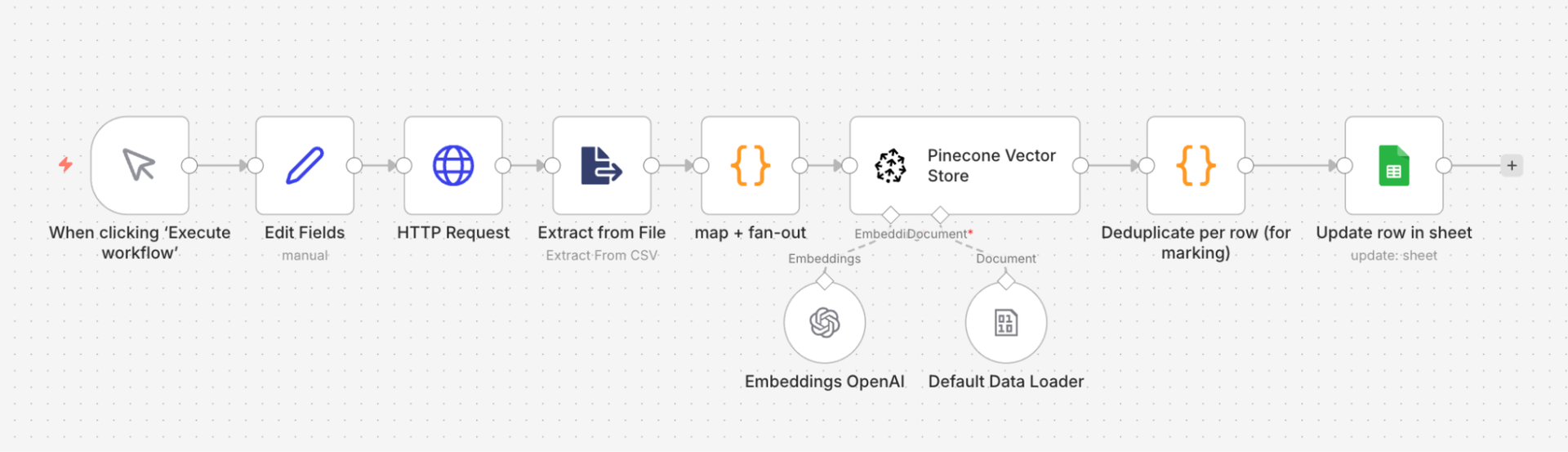
n8n pipeline to embed chunks from published content into Pinecone.
Each chunk gets passed to OpenAI for embedding and then stored in the Pinecone Vector Store via a Default Data Loader. That loader transforms the rows from Google Sheets into the structured metadata and vector records Pinecone uses for retrieval.
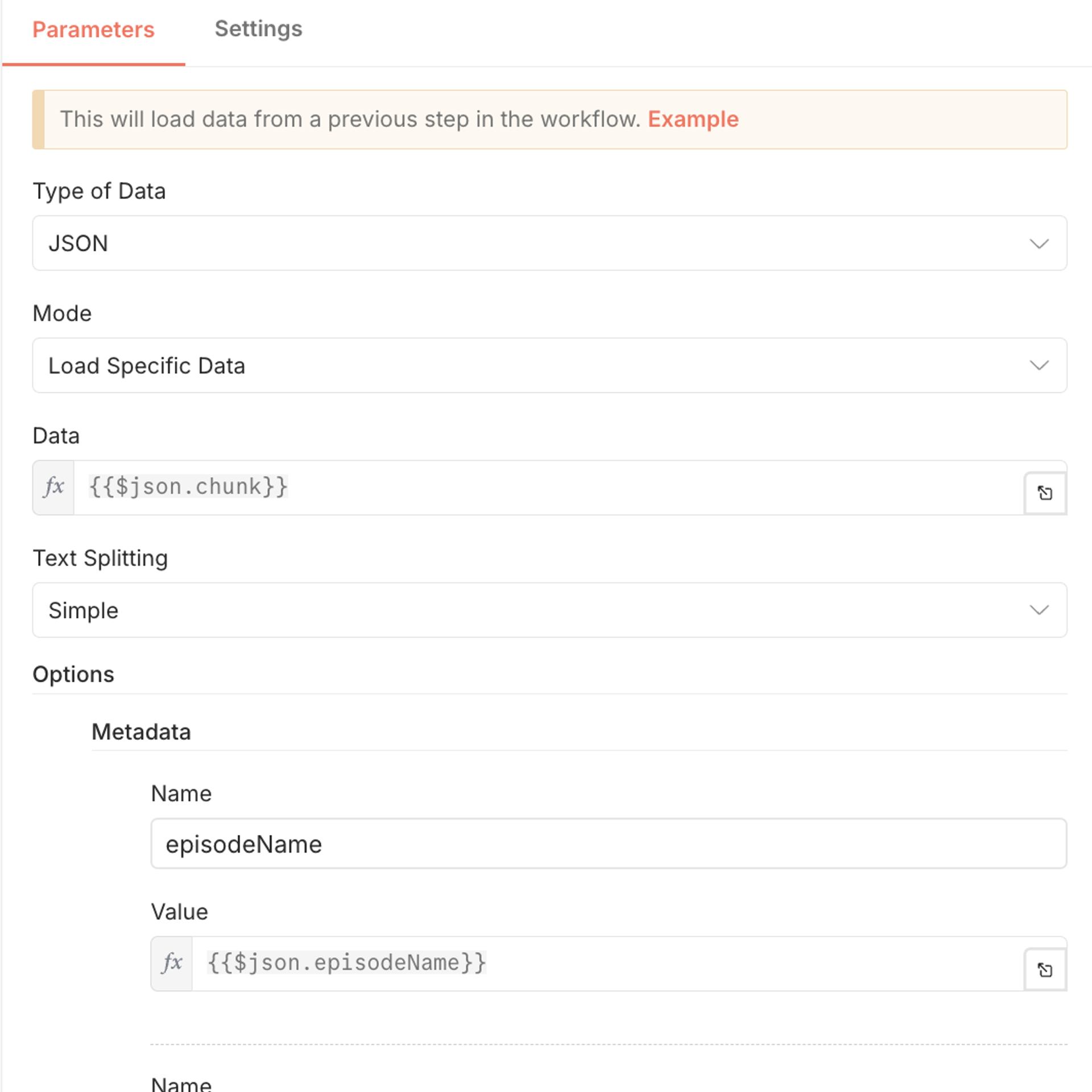
The Default Data Loader for creating vector embeddings in n8n.
Step six: keep the system clean and keep the costs in check
Once embedded, the workflow checks for duplicate chunks and marks each one as processed in the Google sheet. That keeps content from being embedded twice, prevents unnecessary reprocessing, and helps keep OpenAI API costs down.
How to think in RAG
Most content gets written for publication and then sits in an archive. RAG changes what that archive is for. Every article, transcript, or report becomes a source your agents can draw from when answering questions, drafting responses, or generating recommendations.
Of course, this only works if the content is structured in a way that makes retrieval accurate.
In practice, that means writing with clear section breaks, keeping metadata consistent across content types, and deciding upfront how content should be chunked before it goes into the pipeline. The structure of your content library matters as much as its size.
I also keep my pipeline self-updating, so new content flows in automatically rather than requiring a manual upload each time I publish something.
The knowledge base grows alongside my output, so the agents running on top of it become more useful over time without any additional configuration on my end.
Now you try. Turn years of content into a compounding knowledge engine:
Once content is flowing into the knowledge base and can be retrieved on demand, the system becomes a foundation that other workflows can build on.
For example, I use this same RAG layer to power a journalist query response agent. When a media opportunity arrives, the agent evaluates its relevance, retrieves supporting material from my content library, and drafts a response for review. Instead of starting from a blank page, I start with a response grounded in ideas I’ve already published.
The same foundation also powers my podcast content discovery workflow. By making years of transcripts searchable, I can quickly surface relevant insights and examples for new content, social posts, and outreach opportunities. One version of this workflow even helped me identify and engage with a prospective client.
More broadly, RAG transforms a growing archive of content into a usable knowledge source. Instead of letting articles, transcripts, and other assets disappear into an archive, I can continuously reuse and build on work I’ve already invested in.
The knowledge base also becomes more valuable over time. Every new article, transcript, or content asset expands what the system can retrieve, which means older content continues generating value long after it was published.
Resources to replicate these workflows
More data from the AI Lab.
