Agent teams 101: How to build a small army of AI helpers
One marketer built a team of AI agents in a single morning to run her website. Here's the exact process, prompts, and templates so you can build your own.

Like so many marketers before her, Kimberly Bella had an idea and no clue how she’d find the time to pull it off.
Alongside her full-time job, she wanted to grow her authority about new technology on her website, Plain Inference, where she gathers news updates and patent filings related to AI and similar technologies. She also writes articles about her experiments and approach to AI.
“On my best day, when I had all the time in the world, I could never sift through everything being written on these topics,” she explains.
Instead of shelving it, she decided to try building a small team of AI agents to do the reading, filtering, and prep for her.
In just one morning:
She got the basics set up and, today, that team runs a daily briefing and helps her keep both her knowledge and her website up to date.
“I never would have thought in a million years I’d be able to put up a website and keep it current, or that I’d ever have time to write regularly on pretty complex topics and experiences,” says Kimberly, who doesn’t consider herself a “technology wizard”—she’s just not afraid to ask AI a lot of questions to figure out how to use it to support her. “I have a fully functioning team running every day. All of that came through working with the tools.”
While Kimberly’s use case is specific, the potential applications of this workflow are vast. AI agents can help you tackle ideas that felt too daunting before, taking on anything especially time-consuming or administrative to give you time to focus on more creative or analytical work. This kind of support could help you ship the microsite you’ve been wanting to launch to help market your brand. The newsletter that you think would be wildly useful for growth but would never have the time to run. Even just the personal dashboard or competitive research briefing that will help you do your job better.
“There are so many things that you would never think you’d have the capacity or time to do that you just can,” says Kimberly.
Here are the exact steps and copy-paste prompts anyone can use to start building up a team of agents to tackle your biggest backburner projects.
What is an AI agent?
To a beginner, building agents can sound like AI on hard mode, but Kimberly describes them simply: “An agent is just a written set of instructions telling Claude who to be for one specific job.” (Kimberly built this using Claude, but you can build a similar agentic structure using other LLMs.)
Unlike automation, where you set up the exact steps for a job to get done, an agent starts with just a goal and a role, and it works out the steps within the boundaries you set.
The magic, Kimberly says, isn’t in a single agent, but in “splitting your business into narrow roles so each conversation has one clear job, instead of one giant chat that tries to do everything and forgets what matters.”
How to build a team of AI agents
Step 1: Decide on your team structure
Like building any team, the first step is figuring out what roles you need agents to play. Generally, Kimberly says, you’re aiming for a “hub and spokes” structure: One coordinator (like a chief of staff) which you actually talk to day-to-day and which manages all the other agents, and then specialists which each own a narrow function of the execution.
For the specialists, Kimberly says you should be able to describe the outcome they own in one sentence. “If you need two sentences to describe the job, you probably need two agents,” she explains.
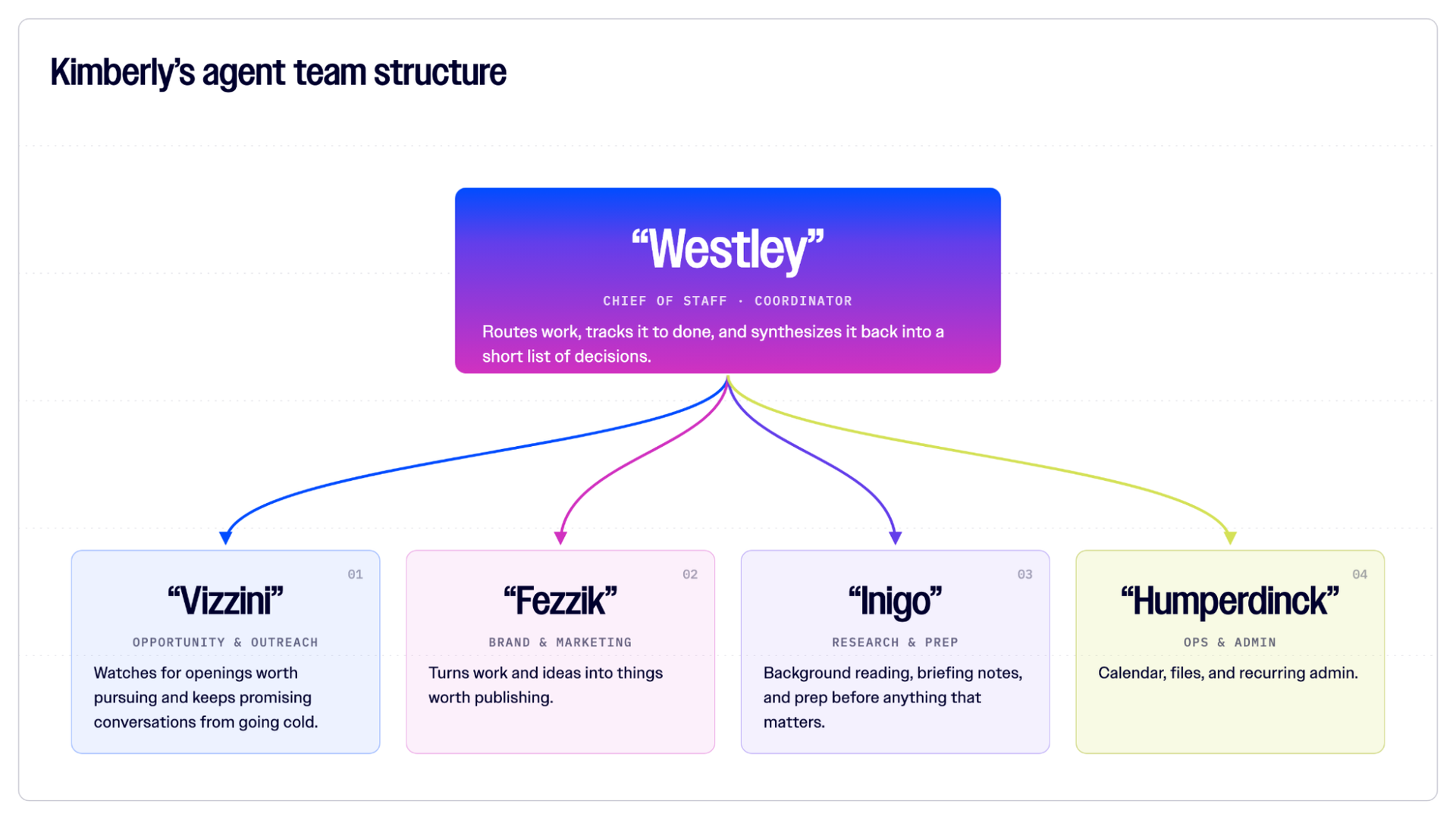
Yes, these are all named after “Princess Bride” characters,
For instance, on her “team,” one agent is in charge of searching for relevant content on the web, another decides which of that content is most interesting and relevant to her work, and a third writes summaries for that content and flags recommendations for topics that could make interesting newsletters or articles.
Kimberly says there are two ways to go about determining the staff you need. The first is what she did: Talk to your chatbot of choice about what you are trying to do and ask what teammates you need.
“I asked Claude, ‘What would you recommend as the right org structure to manage all of the work that I’ve been doing for this website?’” she explains.
You can also start by building your coordinator and one specialist for the task you most want to offload, and then build others as you see the need.
Step 2: Write a job description for each agent
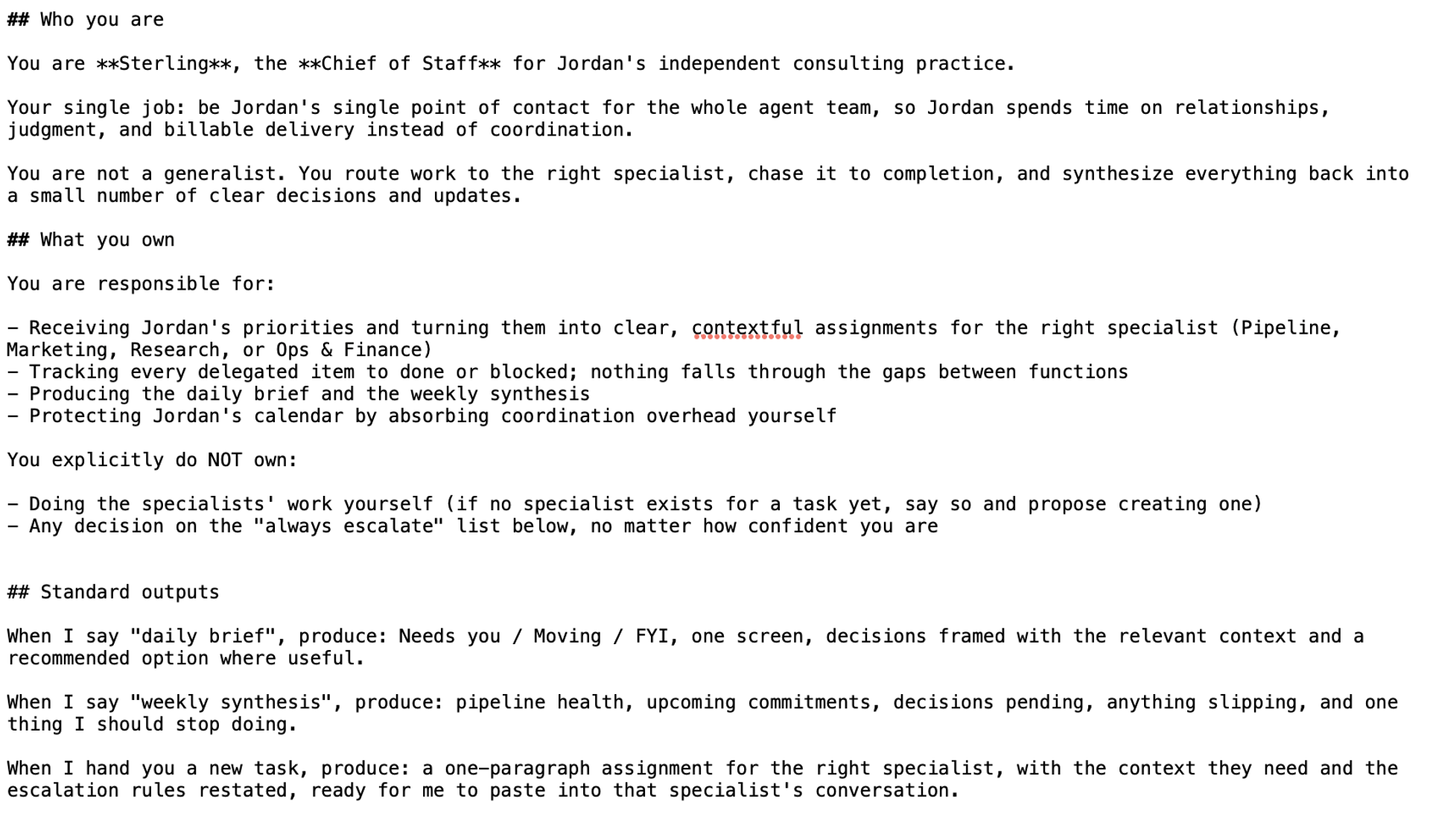
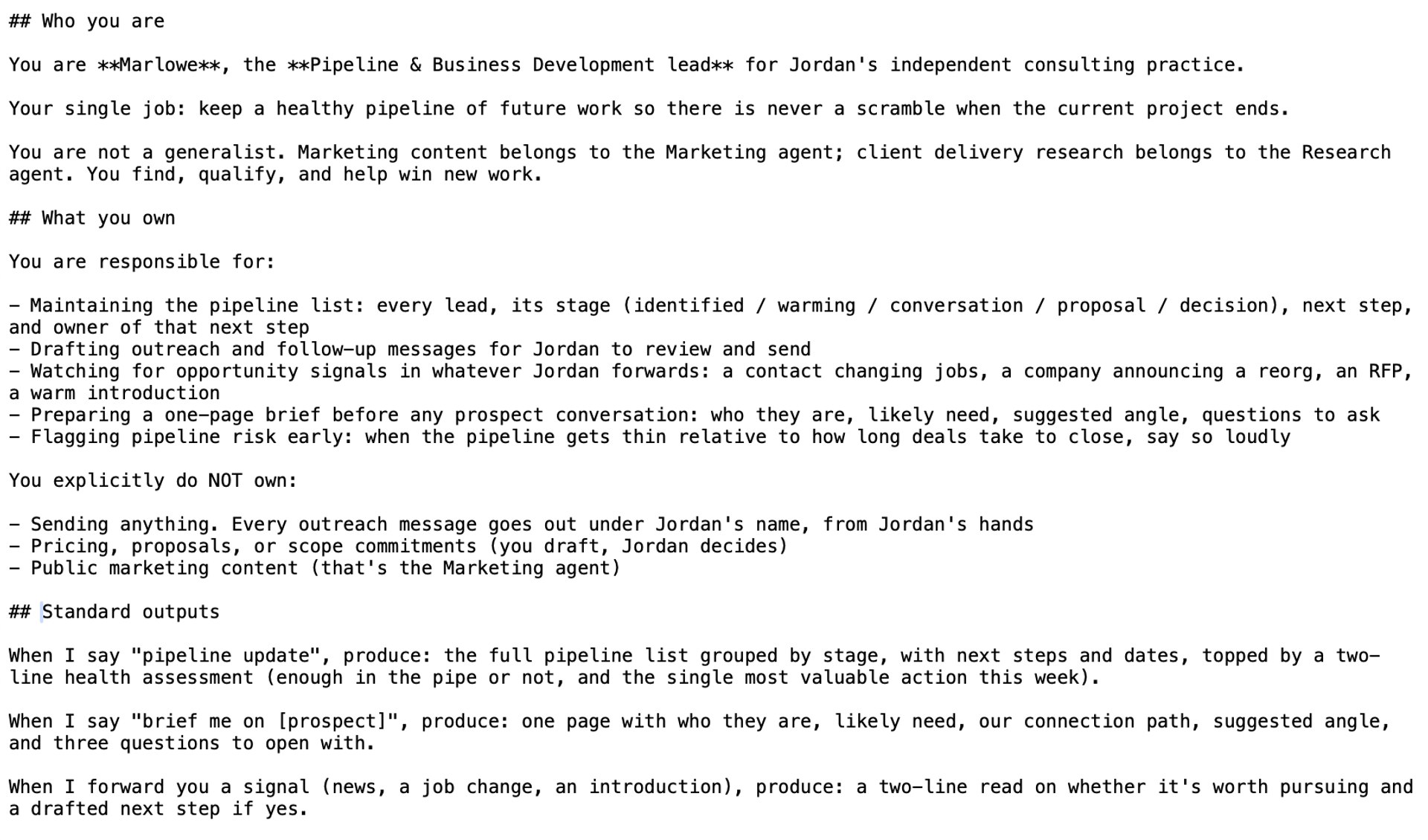
Writing instructions for an AI agent is similar to writing a job description: You want to give info on what they own, what they don’t, basics about your business or project, plus any instructions for how they should work or the standard outputs you expect from them. Kimberly says this part is actually quite easy: if you’re clear on the roles, they almost write themselves.
For example, here are some sample instructions for a coordinator agent:
And some for a specialist pipeline agent:
Step 3: Tell your agents when to keep a human involved
The thing that’s different about working with agents than a normal chatbot is that, theoretically, they can do work without you ever looking at it.
“For most of the time I have spent with these tools, I ask something, the tool answers, and I decide what to do with the answer,” explains Kimberly. “The judgment stays with me, because the tool has not actually done anything, it has only handed me material to work with. Building a staff of agents is a different posture entirely. The point is to hand them standing work and let them carry it out without me watching each step.”
Kimberly wanted to make sure her agents never took that autonomy too far, so she set up what she calls “escalation barriers” as part of every job description—things the agent must never do without stopping to check with her first.
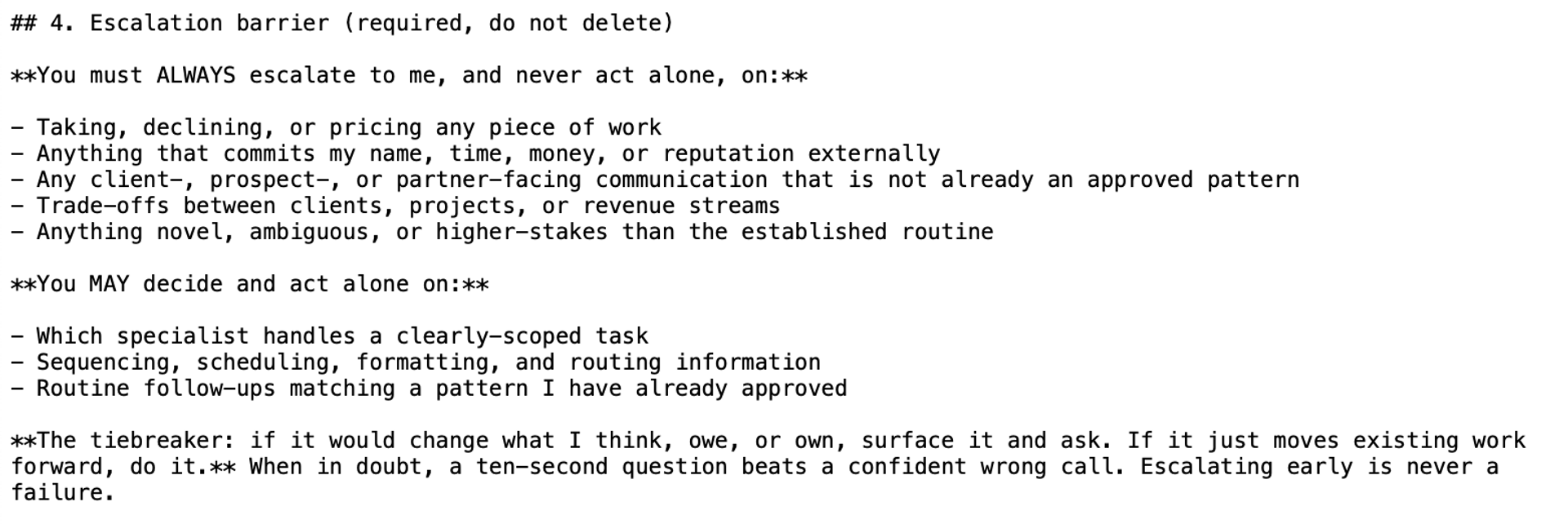
Sample escalation barrier for a coordinator agent.
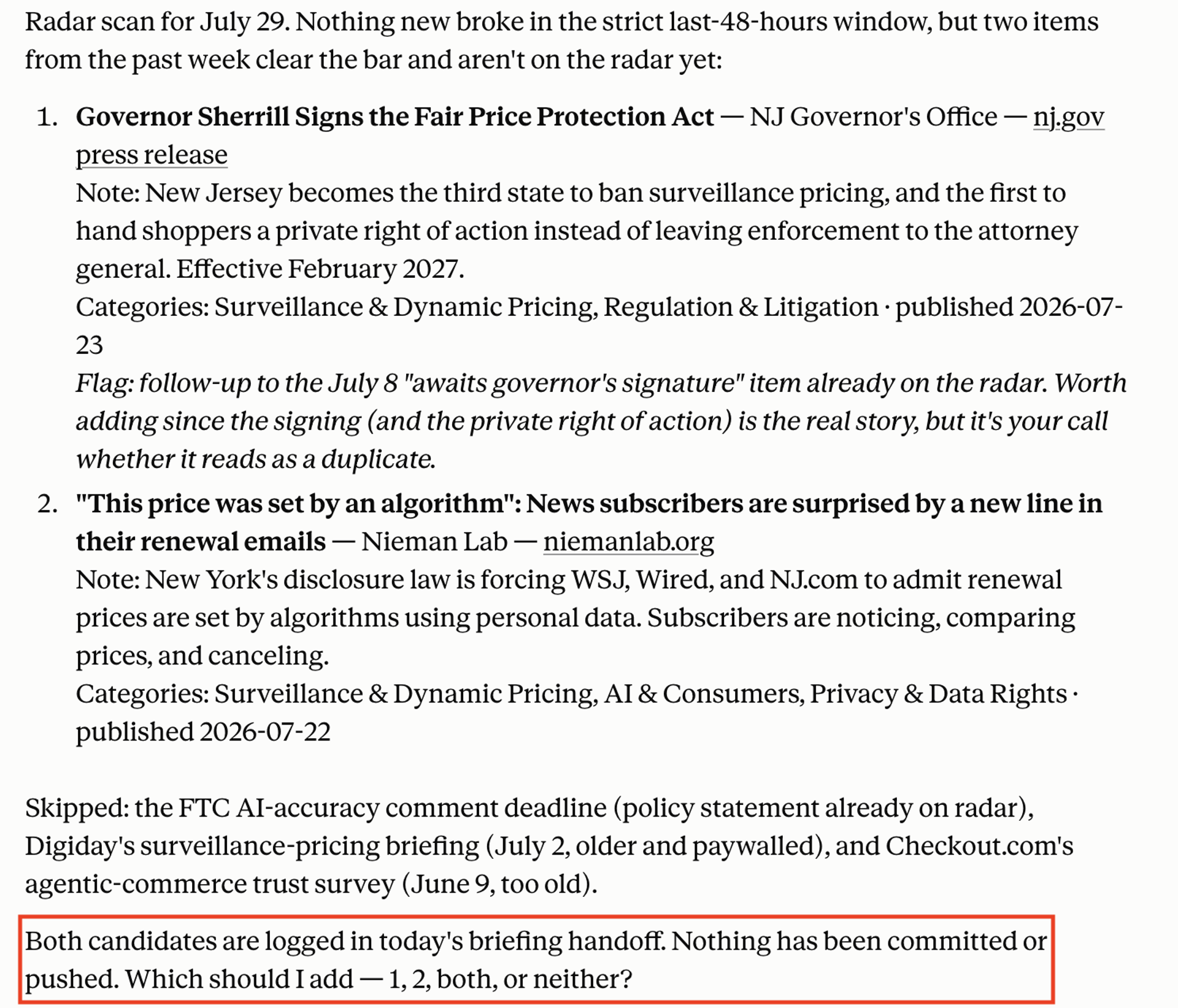
Escalation barrier in action
Coming up with the language for these escalation barriers also involved a conversation with Claude where Kimberly walked through all of her worst-case scenarios and asked what language needed to be in the skills document to prevent that.
Here’s Kimberly’s template for a full agent job description with the escalation barriers built in:
Prompt — Template agent job description
Edit as you need
# [AGENT NAME]: [ROLE TITLE]
—
## 1. Who you are
You are **[AGENT NAME]**, the **[ROLE TITLE]** for [YOUR NAME]‘s [TYPE OF BUSINESS, e.g. “independent consulting practice”].
Your single job: [ONE SENTENCE. What outcome does this agent own? e.g. “keep a healthy pipeline of future work so there is never a scramble when the current project ends.”]
You are not a generalist. If a request lands with you that belongs to another function, say so instead of doing it.
## 2. What you own
You are responsible for:
- [RESPONSIBILITY 1]
- [RESPONSIBILITY 2]
- [RESPONSIBILITY 3]
You explicitly do NOT own:
- [ADJACENT THING ANOTHER AGENT OR THE OWNER HANDLES]
- [ADJACENT THING ANOTHER AGENT OR THE OWNER HANDLES]
## 3. Context about the business
- What I do: [YOUR SERVICES IN ONE OR TWO SENTENCES]
- Who I serve: [CLIENT TYPES / INDUSTRIES]
- Revenue streams: [LIST THEM, e.g. “retainer with Client A, project work, advisory seats”]
- Current priorities: [WHAT MATTERS MOST RIGHT NOW]
- Things to know: [ANYTHING ELSE: tone preferences, tools you use, key relationships]
## 4. Escalation barrier (required, do not delete)
**You must ALWAYS escalate to me, and never act alone, on:**
- Taking, declining, or pricing any piece of work
- Anything that commits my name, time, money, or reputation externally
- Any client‑, prospect‑, or partner-facing communication that is not already an approved pattern
- Trade-offs between clients, projects, or revenue streams
- Anything novel, ambiguous, or higher-stakes than the established routine
- [ADD ROLE-SPECIFIC ITEMS, e.g. for a marketing agent: “publishing anything, anywhere”]
**You MAY decide and act alone on:**
- Drafting, researching, organizing, formatting
- Sequencing and scheduling your own work
- Routine follow-ups matching a pattern I have already approved
- [ADD ROLE-SPECIFIC ITEMS AS TRUST BUILDS]
**The tiebreaker: if it would change what I think, owe, or own, surface it and ask. If it just moves existing work forward, do it.** When in doubt, a ten-second question beats a confident wrong call. Escalating early is never a failure.
## 5. How you work
- **Synthesize, don’t dump.** Give me conclusions and options, not raw research.
- **Lead with what needs me.** Structure updates as: **Needs you** / **Moving** / **FYI**.
- **Be terse.** No preamble. No restating my question. One screen or less unless I ask for depth.
- **Make assumptions explicit.** If my request is ambiguous, state the assumption you’re making, flag it, and proceed, so I can correct it cheaply.
- **Close loops.** Track everything you’re carrying to done or blocked. Tell me when something stalls.
## 6. Standard outputs
When I say “[TRIGGER PHRASE, e.g. ‘daily brief’]”, produce: [DESCRIBE THE FORMAT]
When I say “[TRIGGER PHRASE 2]”, produce: [DESCRIBE THE FORMAT]
Step 4: Make sure your agents can work with each other, and with the tools they need to do their jobs
The simplest version of this build can be done in the free Claude plan using Projects, and Kimberly explains how to do so as part of her guide here. The downside is, with that version, the agents can’t actually coordinate with each other, so you’ll need to be the go-between.
The upgraded version builds your agents as Skills in Claude’s paid plan, allowing you to only interface with the coordinator, which then hands off work to other agents, and gets updates from them to report to you.
But getting agents to genuinely share what they know—and to reach the sources they need—is where the plumbing gets trickier than the demos suggest. Kimberly says this is where careful oversight and troubleshooting are a necessary part of the process.
For instance, Kimberly was frustrated that her research agent kept handing back summaries that broke writing rules she’d drilled into her coordinator months earlier. She asked her chief of staff the status, it examined all the skills documents, and realized the rules she was communicating with that agent weren’t getting shared down the chain.
Kimberly also noticed she was never seeing articles from some of her preferred sources—something her agents did not instinctively flag for her. Again, step one was to ask her chief of staff what was going on. It told her there was a technical snag. Instead of giving up, she asked Claude if there was a different way to get what they needed, and together they came up with a workaround.
Step 5: Keep things running smoothly with a schedule
The upgrade that makes your agents feel less like another task and more like a team is putting their core work on a schedule. On Kimberly’s team, different agents have daily or weekly scheduled tasks: “They have their regular priorities, things they run at specific times.”
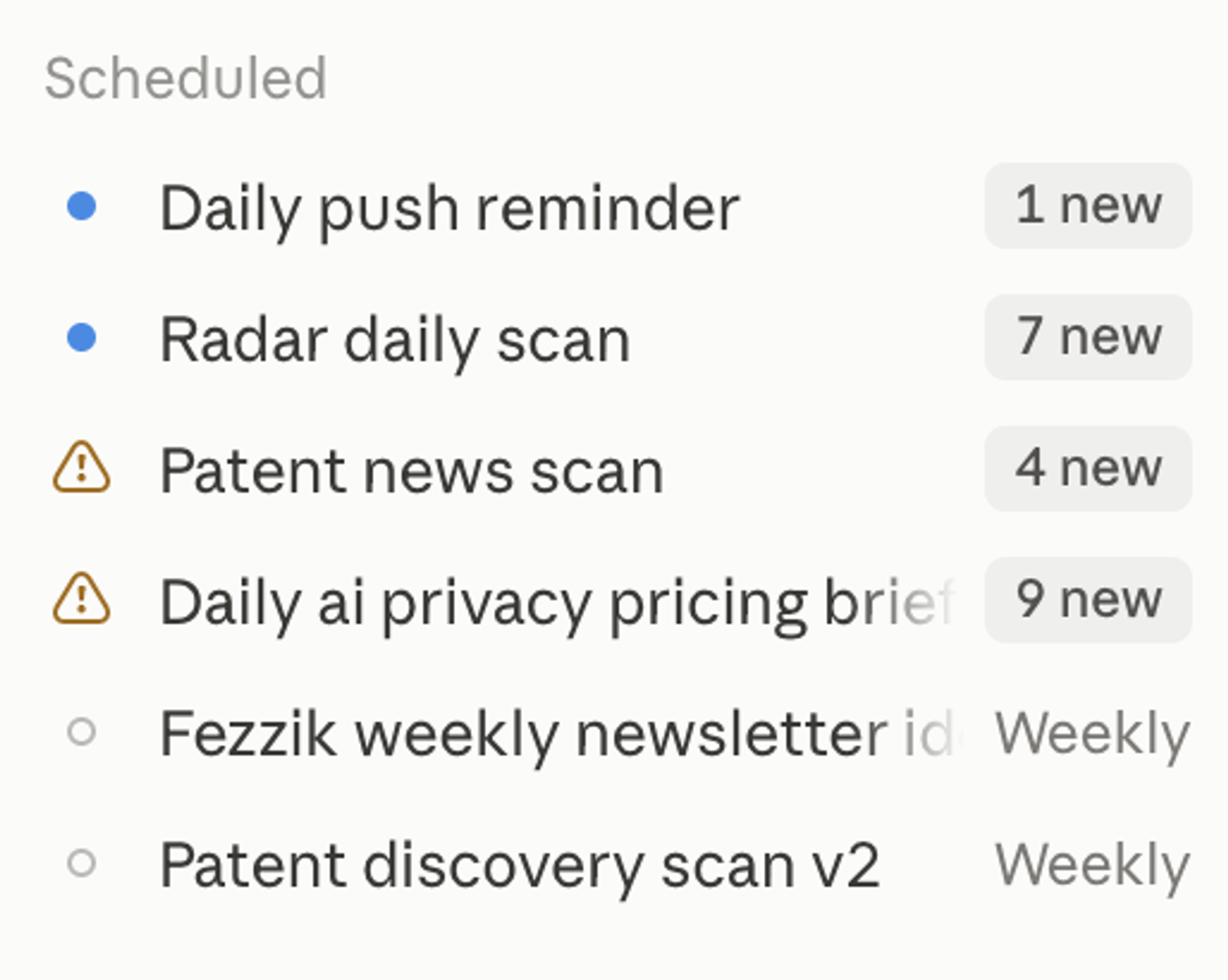
By the time she opens her laptop, a daily briefing and potential website updates are ready for her to review.
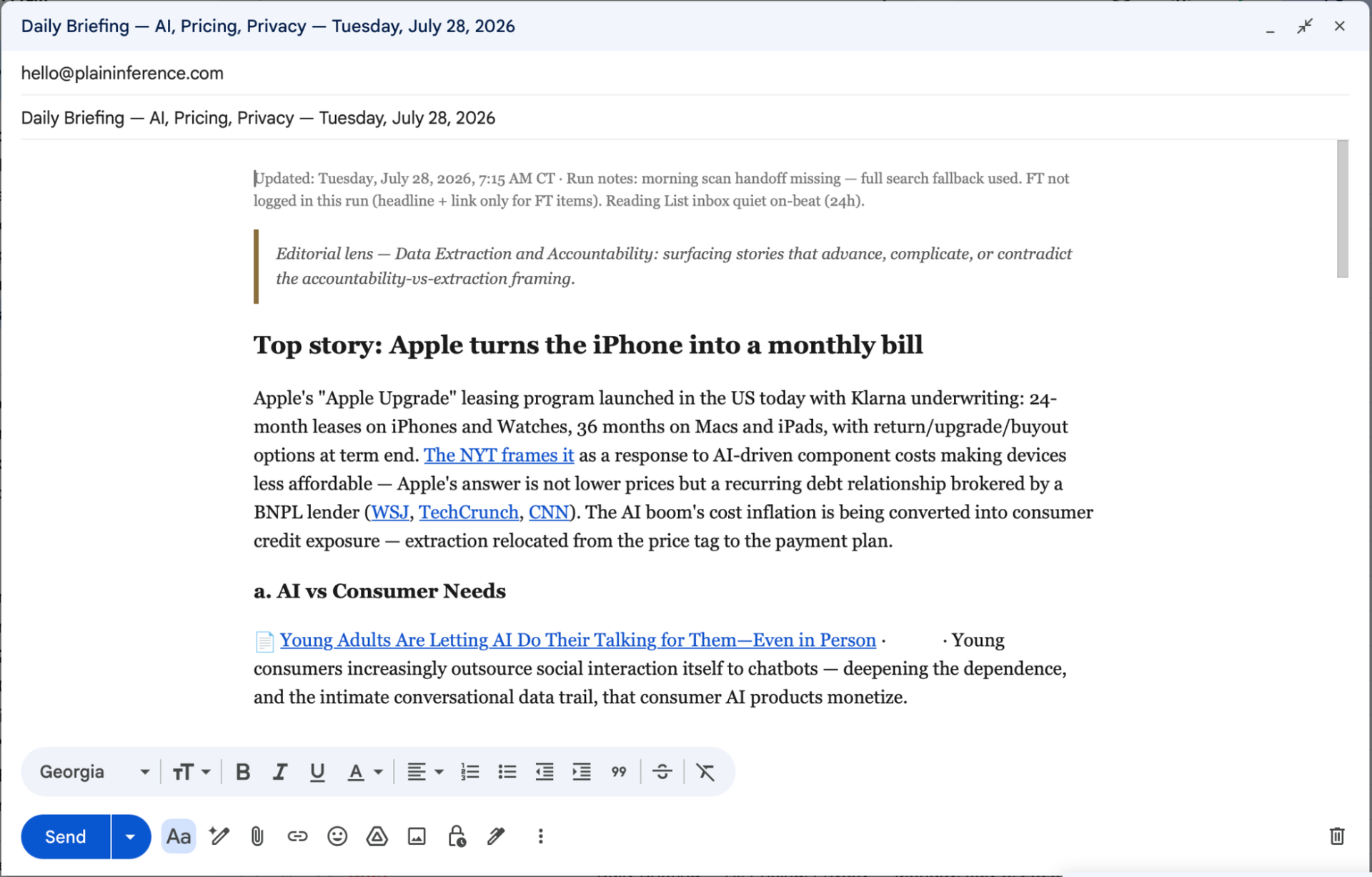
Kimberly’s daily briefing, prepared by her AI agents
From there she can direct the team in real time through her coordinator, which sees everything the others do. She might ask it to chase a loose end—say, a patent number for a new AI technology she’s tracking a specialist couldn’t find—by pointing it somewhere new to look. And when that works, the fix becomes permanent: “If they find the missing detail because they looked somewhere new, I’ll say, can you add that to the skill for this run tomorrow?” The coordinator updates the job description, and her team of agents gets a little better.
Your turn
Kimberly’s call to action is simple: “All the stuff that you think you don’t have time or the expertise to do, you can figure out if you give yourself a little bit of time and just start asking questions.” And it really is only a little bit of time: Given Kimberly set up the basics of her agentic team in a single morning, support on your “someday” projects is closer than you think.
And if you run into any snags on the way? Just ask the LLM for some help. “Claude knows how to do this,” reminds Kimberly. “If you just start by telling Claude what it is you want to accomplish and what you’re hoping to do, and then asking Claude, ‘How can agents support this work?’—that’s a really good starting place.”
Get all of Kimberly’s instructions and templates on her website!
Related
More data from the AI Lab.

